Point of Sale (POS) System for Cafes, Bakeries & Restaurants in New Zealand
Fast counter and phone orders from any tablet.
A cloud-based POS that runs in the web browser on any tablet or phone. It shares one menu, one customer list and one sales report with your online ordering, app and kiosk, and every order goes straight to your kitchen display, docket printer or existing POS.
Software only: runs on your own tablet or phone with an internet connection.

Why Use the mypreorder POS
Fast Counter Orders
Text-only tiles built for speed. One tap adds an item, and a badge shows what's already in the order.
Phone Orders, Now or Later
Take a phone order for ASAP, or for a later time when your store takes orders for later.
Any Tablet or Phone
The tablet signs in on your ordering site in the web browser, then each staff member uses their own PIN. There's nothing to install; it just needs an internet connection.
One System for Every Order
Counter and phone orders share one menu, one customer list and one sales report with your online and kiosk orders, and land on the same kitchen display and dockets.
One Cloud System, Counter to Kitchen
The POS isn't a separate system bolted onto your online ordering. Counter, phone, online, app, QR table and kiosk orders all run through one menu, one customer list and one merchant portal.
One Menu
Prices, options, stock and specials, set once in your merchant portal. Mark an item sold out on the POS and it comes off sale online and on the kiosk too.
One Customer List
Members' points, VIP discounts and rewards follow them from your app and website to the counter. Find them by mobile or email, or scan the loyalty card in their app.
Every Order on the POS
Online, app and kiosk orders show on the POS beside counter orders, with an alert and a chime for each new one. Staff can find any order, take payment or reprint its docket.
One Sales Report
The Sales Summary covers counter, phone, online, app, QR table and kiosk sales together, with your takings by payment type. Each till's cash-up sits beside it.
From First Tap to Next Order
What your staff see at the counter. Scroll across for each step.
- 1
Build the order
Tap tiles to add items. The ticket shows each item, its quantity and the running total.
 2
2Pick the options
Items with sizes, milks or extras open an options screen with each option’s price.
 3
3Check out
The customer’s name is all you need, or find a member by mobile, email or the loyalty card in their app.
 4
4Take payment
Choose EFTPOS and the amount goes to your terminal. Choose Cash and the POS shows the change and opens your cash drawer.
 5
5Order placed
The order number, the customer’s name and Paid. Next order starts a clean one.
EFTPOS Payments at the Counter
Staff choose EFTPOS and the amount appears on your integrated terminal. The screen shows each step, from “Present your card” to “Approved”, then places the order.

Works with EFTPOS terminals from Verifone. Linkly connects the POS to your terminal over the internet, with no cable between them.
- Cash, with the change due, the cash drawer and a till you count up at close
- Card (keyed) for phone orders, charged through your own online payment gateway
- Other, for any other way the customer pays
- Refunds approved with a manager's PIN, back the way the customer paid


Know Who Every Order Is For
A name is all a counter order needs. Add more when the customer wants it.
Just a Name to Start
The customer's name is the only required field, so a quick order stays quick. Email and mobile are optional.
Find Members Fast
Search by mobile or email, or scan the loyalty card in their app. Their points, VIP discount and rewards apply to the order, and the order earns them points.
Sign Up at the Counter
Make an account for a new customer while they wait. They earn points from their first order and get a link to set their password.
Notes for the Kitchen
An order note for allergies and special requests, so the kitchen sees it with the order.
Promo Codes
Tap one of your codes, or type one in. Each code can work at the counter, online, on the kiosk or any mix of them.
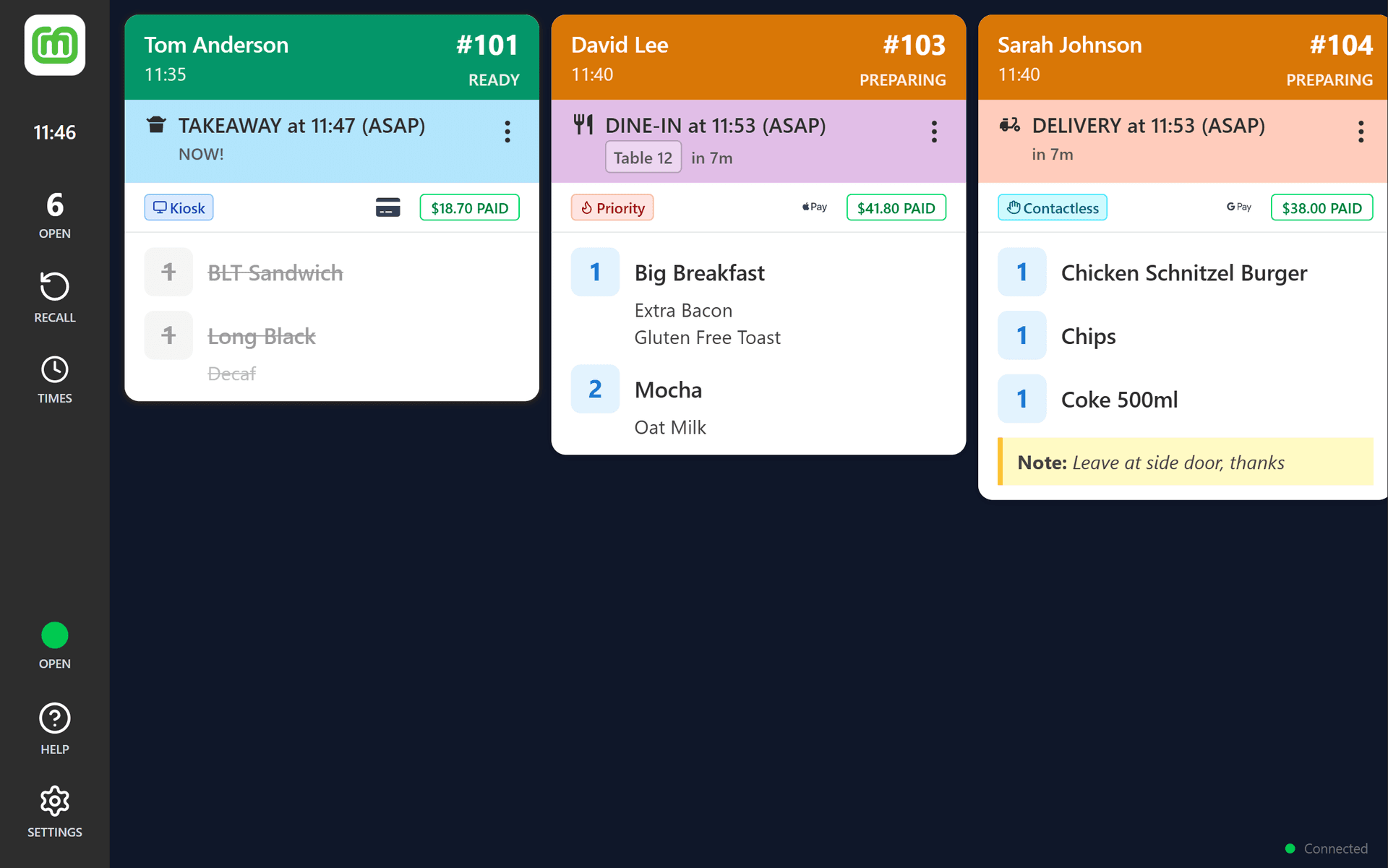
Orders Sent Straight to Your Kitchen
Counter and phone orders arrive the same way as your online and kiosk orders. Choose where they go:
Kitchen Display System
Orders appear on your KDS as soon as they're placed, ready to bump through each preparation stage.
Docket Printers
Print a docket for every order on a Star or Epson printer. The POS can print straight to it over your shop's network, so the docket and the cash drawer go the moment you take the sale.
Made for Busy Staff
Every screen is built so staff can take an order quickly, get it right and move on to the next customer.
Tap to Add
One tap adds one. Quick taps add more, and a badge on the tile counts what's already in the order.
Search Every Item
Search across every category at once when you know what the customer wants.
Easy Changes
Change quantities up or down on the ticket. Clear empties the order when a customer changes their mind.
Tablet or Phone
On a tablet, the ticket sits beside the menu. On a phone, items are rows, with a bar showing the item count, the total and Review order.
One Menu Everywhere
The same menu, prices, stock and time-of-day availability as your online ordering and kiosk. Mark an item sold out on the POS and it's off sale everywhere.
Manager Mode
Refunds, No sale, closing the store and the POS's own settings sit behind a manager's PIN, set in your merchant portal.
Staff PINs
Each staff member signs in with their own PIN, switches in a tap and locks the POS when they step away. Every order records who took it.
Till & Cash-ups
Start with a float, record cash paid in and out, check an X report mid-shift and close with a Z report. Every cash-up is kept in your merchant portal.
Comps & Tax Invoices
Make an item complimentary with a reason, and email or print a tax invoice from the Orders screen.
Runs in a Web Browser Today
Nothing to install on your tablets or phones, just an internet connection. Android and Windows apps are on the way.
Web Browser
Staff sign in on your store's ordering site on any tablet or phone with an internet connection.
Android App
A native app for Android tablets and phones.
Windows App
A desktop app for Windows PCs and tablets.
Point of Sale (POS) FAQ
What you need, how staff take payment and where the orders go.
The POS is software only, so you'll need your own tablet or phone with a web browser and an internet connection. The tablet signs in once on your store's ordering site, then each staff member uses their own PIN, so there's nothing to install. Android and Windows apps are coming soon. To take card payments at the counter, you'll also need a Verifone P630, T650P or T650C EFTPOS terminal, and for cash, a cash drawer plugged into a Star or Epson receipt printer.
Yes. The POS runs in the web browser and needs an internet connection to take orders and payments.
Pro includes one POS licence per store, alongside your online ordering and branded apps. Add the POS to Starter or Growth, or add more licences on any plan, for $59/month per licence.
A Verifone EFTPOS terminal, connected through Linkly over the internet, so there's no cable between them: Verifone P630, T650P and T650C. Skyzer's Move 5000 connects to Linkly only on site, not over the internet, so it doesn't work with the POS.
Yes. Choose the order type, then ASAP or a later time. Later times are available when your store takes orders for later.
Yes. Choose Cash at checkout and tap the amount handed over: the POS shows the change and opens the cash drawer. Turn on the till to start each shift with a float, record cash paid in and out, and close with a Z report that counts the drawer. Every cash-up is kept in your merchant portal.
Yes. Plug the cash drawer into a Star or Epson receipt printer and the POS opens it for cash sales, cash refunds, No sale, cash paid in and out, and closing the till. The POS prints dockets, tax invoices and X and Z reports straight to the printer over your shop's network.
Yes. Each staff member signs in with their own PIN, and can switch to someone else or lock the POS in a tap. A manager's PIN approves refunds and opens manager mode, and every order records who took it.
Yes. Find them by mobile or email, or scan the loyalty card in their app. Their points, VIP discount and rewards apply to the order, and the order earns them points, just as ordering online does. New customers can join at the counter.
Yes. The Sales Summary in your merchant portal covers every order your store takes, from the counter, the phone, online, your app, QR codes on the tables and the kiosk, for any date range. It breaks your takings down by product, discount and payment type, such as online card payments, EFTPOS and cash. Each till's cash-up, with its Z report, is kept there too.
Wherever your online and kiosk orders go: your mypreorder Kitchen Display System, your Star or Epson docket printer, and your POS if we integrate with it (for example Uniwell or Square).
Yes. Counter and phone orders reach your existing POS through the same integrations as your online orders, such as Uniwell and Square. Keep your POS and use the mypreorder POS for fast counter and phone orders on your mypreorder menu.
No. The mypreorder POS doesn't connect to scales or other measuring instruments, so it isn't weighing equipment under New Zealand's trade measurement rules. If you sell goods by weight, the scale you weigh them on must be approved for trade.
Yes, in full or in part, with a manager's PIN, and the money goes back the way the customer paid. Staff can also cancel an order, reprint its docket or give a tax invoice from the Orders screen.
Add a self-ordering kiosk. It uses the same menu and sends orders to the same kitchen display, printers and POS.
What Our Customers Say
There's lot to love about mypreorder. Customers love how easy it is to use and set up favourites for repeat orders. Our team love the printed order tickets. And I love the seamless integration with our POS and back up support from John and his team.
If you're looking for an online platform, look no further… this has been a game changer for our business.
We have used mypreorder for over 10 years for both our customers and our own projects. We stick with them because their product works well and is absolutely reliable. Whenever we need assistance and integrations, they are always provided quickly and without any problem.
We are now using mypreorder in our Wallet Pass payments and distribution solutions for clubs and gyms and will be using mypreorder for all our new projects.
mypreorder has been a game-changer for our café. It's the perfect app for customers who are on the go, whether they're heading to work or just passing through and short on time. With the ability to pre-order and set a pickup time, they can skip the queue and grab their coffee and toastie without the wait—something our regulars absolutely love, especially during busy rush hours. From a business perspective, mypreorder is an incredibly valuable tool. It allows us to showcase our menu with photos and descriptions, promote specials, and provide a seamless ordering experience. It's a great way to boost sales, and honestly, any café not using it is missing out! The support from the mypreorder team has been outstanding. They're always available to assist, helping us refine and develop our use of the app to meet our needs. We highly recommend it to any café looking to improve efficiency and customer experience.
We have been using mypreorder for over a decade, and it has been an essential part of our business growth. John Daniels has been fantastic to work with - always contactable, incredibly helpful, and willing to tailor solutions that suit our needs.
Over the years, John has supported us in expanding our services, ensuring mypreorder adapts to our evolving business, including catering, our virtual kitchen, frozen meals, and giftware. His expertise and dedication have made a significant difference, and we highly recommend him to any business looking for a reliable and flexible online ordering platform.
We recently opened a new cafe and wanted a solid online ordering platform. We contacted John at mypreorder who helped us through the whole process, including planning, POS integration and training.
John provided a high level of support and advice throughout the entire set-up process ensuring that all our requests were addressed promptly. The installation was straight forward and we are very happy with the system. Our customers make good use of the online facility and comment on the ease of use. Thank you, John, for your great service!
mypreorder is remarkable, it enables our business to grow across various sites with simple Copy Menu implementing. It is cost effective, easy to use and John is amazing to deal with.
The App is the most important part of our business so it was important to find the right one and we have. The features are fantastic with colour images, description and various price methods for add ons. Can't recommend this App enough and the Service received by John.
mypreorder has been a trusted partner of Sir Charles Gairdner Hospital for over 10 years, providing a reliable online ordering app for both our hospital canteen and coffee cart. Their platform has helped us streamline operations, reduce wait times, and improve convenience for staff and visitors alike, who all love using the app.
The team at mypreorder is always responsive and committed to delivering excellent service. The system itself is easy to navigate for our staff members who have to make changes to menu items, and the team at mypreorder is always happy to assist with this if we are unable. We highly recommend them to any organisation looking for a dependable online ordering solution!
Ready to Speed Up Your Counter?
Tell us about your store. We’ll set up the POS on your plan and help you connect your EFTPOS terminal.