Kitchen Display System for Restaurants & Cafes in New Zealand
Your Kitchen Command Centre
Turn any tablet into a powerful kitchen display. Built for New Zealand restaurants and cafes — see online orders the instant they arrive, manage every stage of preparation, and keep your kitchen running smoothly.
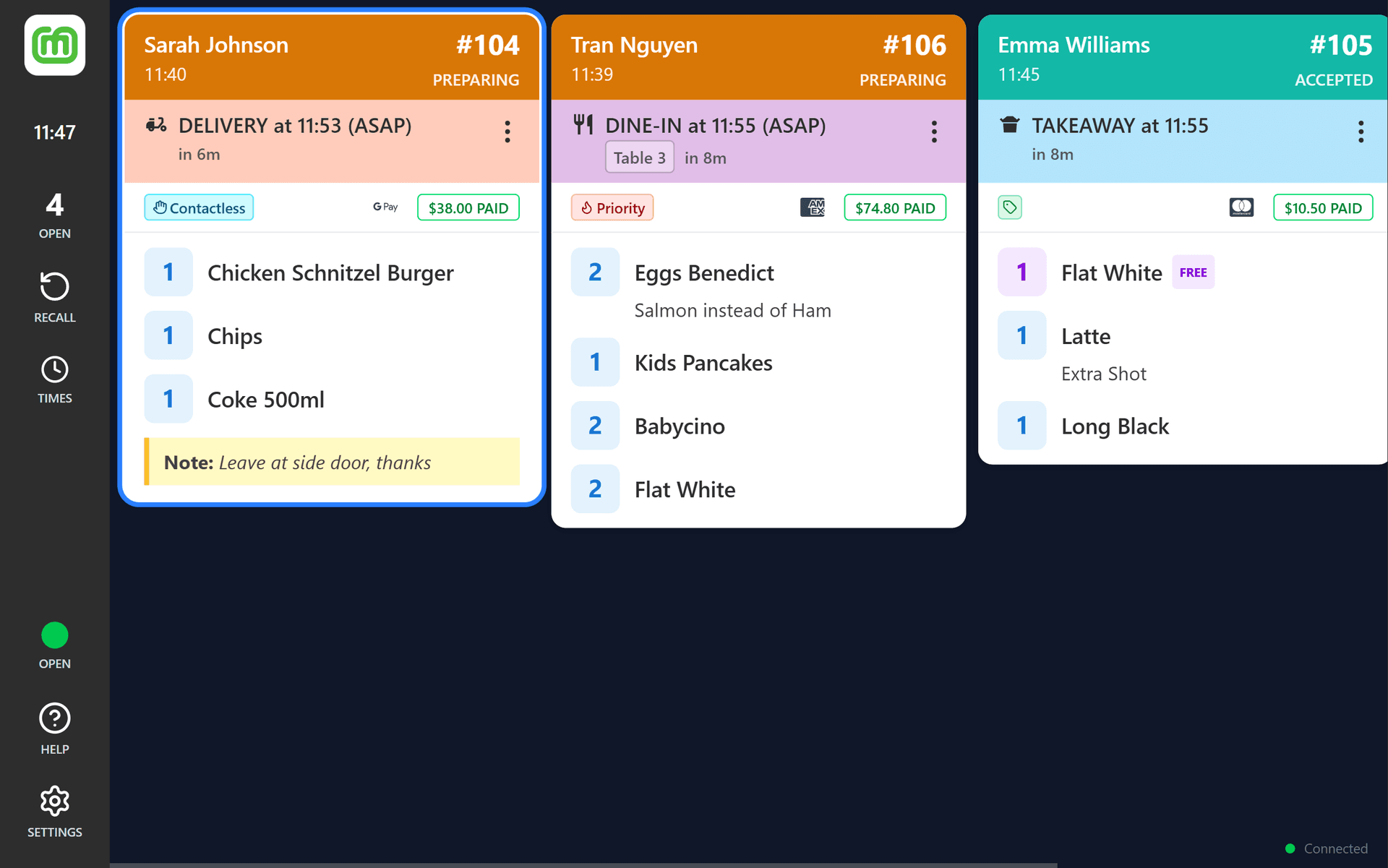
How the Kitchen Display System Works
Get your kitchen display up and running in minutes — no complex integrations required.
Register Your Device
Scan a QR code or enter your merchant credentials to link your tablet to your location.
Log In with PIN
Fast PIN-based staff login (4–6 digits) so the right person is always on the board.
Orders Appear Instantly
Online orders from mypreorder appear on your display in real time with sound alerts. Auto-print dockets to your printers.
Manage & Fulfil
Tap to progress order: prepare > ready > complete. Verify cardholders for prepaid orders. Recall orders and more.
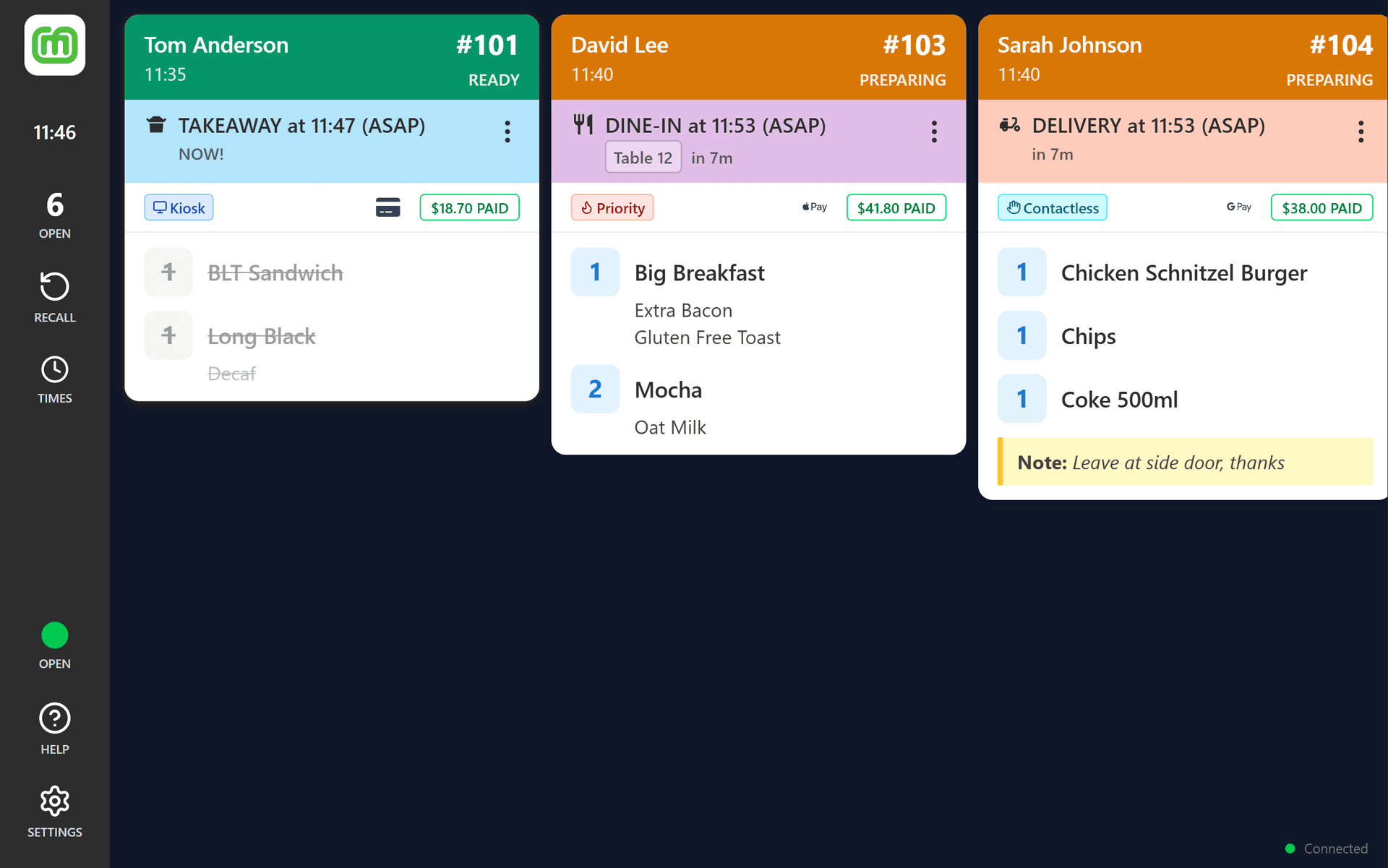
Real-Time Order Management on One Screen
Orders placed through mypreorder appear on your display in real time. Bump them through each stage so your whole team knows exactly what's happening.
One-Tap Workflow
Bump orders through Preparing, Ready, and Completed with a single tap on the order header.
Item Strike-Off
Tap individual items to strike them off as you prepare them — perfect for multi-item orders.
Recall & Context Menu
Recall completed or rejected orders instantly. Reprint, void, mark paid, and more from the context menu.
Payment & Customer Details
See payment details, customer notes, and delivery addresses right on the order card.
Automatic Customer Notifications
Order status updates are automatically communicated to customers, including when their order is being prepared, ready for pickup, or out for delivery.
KDS Features for Every Kitchen
From docket printing to lead time control, the KDS puts your entire kitchen workflow at your fingertips.
Docket Printing
Print kitchen dockets to any ESC/POS receipt printer over your network (TCP/IP) or via Bluetooth. Supports Star Micronics, Epson, and generic thermal printers in 58mm and 80mm paper widths.
Reprint any order from the context menu whenever you need additional copies.
Lead Time Control
Set and adjust lead times for Pickup, Delivery, and Dine-in orders on the fly. Changes are pushed instantly to mypreorder so customers always see accurate wait times.
Colour-coded urgency indicators — green, orange, red — make it easy to spot orders that need attention.
Open & Close Your Store
Toggle your store on or off directly from the KDS. Status changes sync back to mypreorder in real time.
Your online menu reflects your availability the moment you tap the button.
Sound Alerts
Never miss a new order. Choose from four alert sounds — Chime, Bell, Ding, or Alert — and set the volume to suit your environment.
A two-tone ascending chime plays every time a new order lands on your board.
Customisable Display
Light, Dark, or Auto theme. Compact, Standard, or Large card sizes. Adjustable content scaling for readability at any distance. 12-hour or 24-hour time format. Multiple colour themes for order urgency.
Built for All-Day Use
Keep Screen Awake prevents dimming during service. Auto-start on boot so the display is ready when you power on. Stable connection with automatic reconnect and offline fallback.
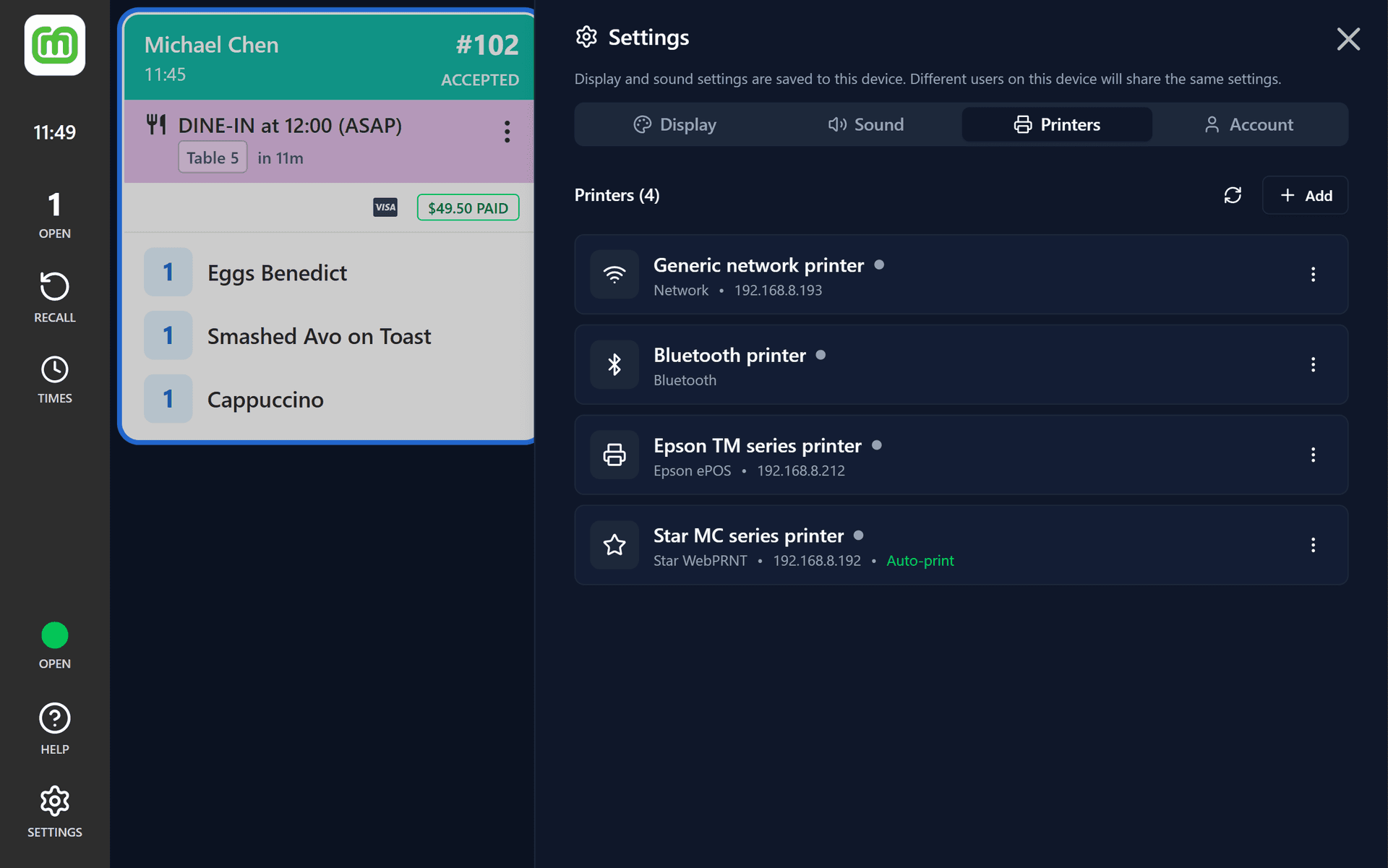
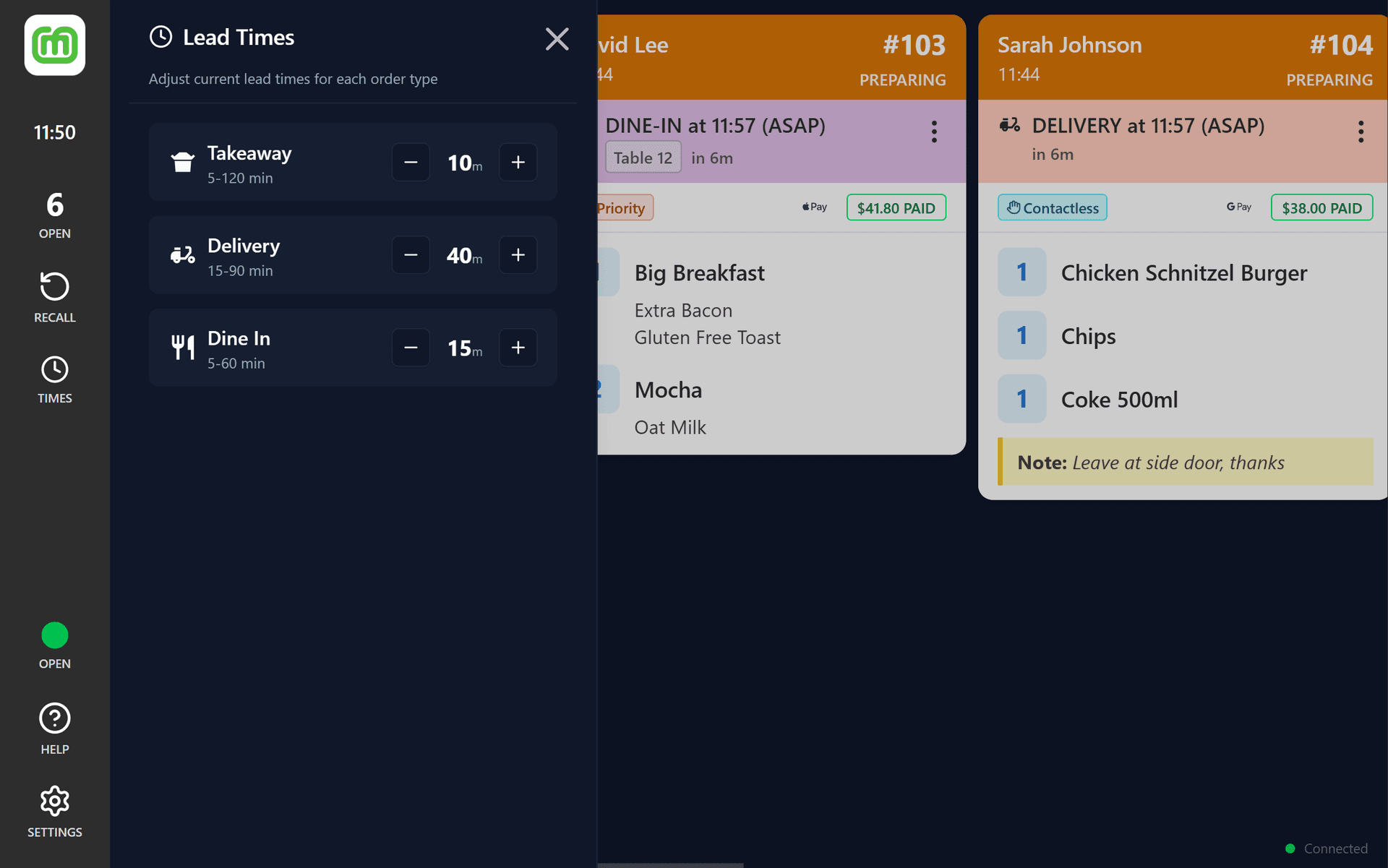
Docket Printing & Lead Time Control
Connect your thermal printer and start printing kitchen dockets over Wi-Fi or Bluetooth. Adjust lead times on the fly so customers always see the right wait time.
Star Micronics, Epson & Generic
Supports all popular ESC/POS thermal printers in 58mm and 80mm paper widths.
Pickup, Delivery & Dine-In Lead Times
Set separate lead times per fulfilment type. Changes push instantly to your online ordering.
Urgency Colour Coding
Green, orange, and red indicators make it easy to spot orders that need immediate attention.
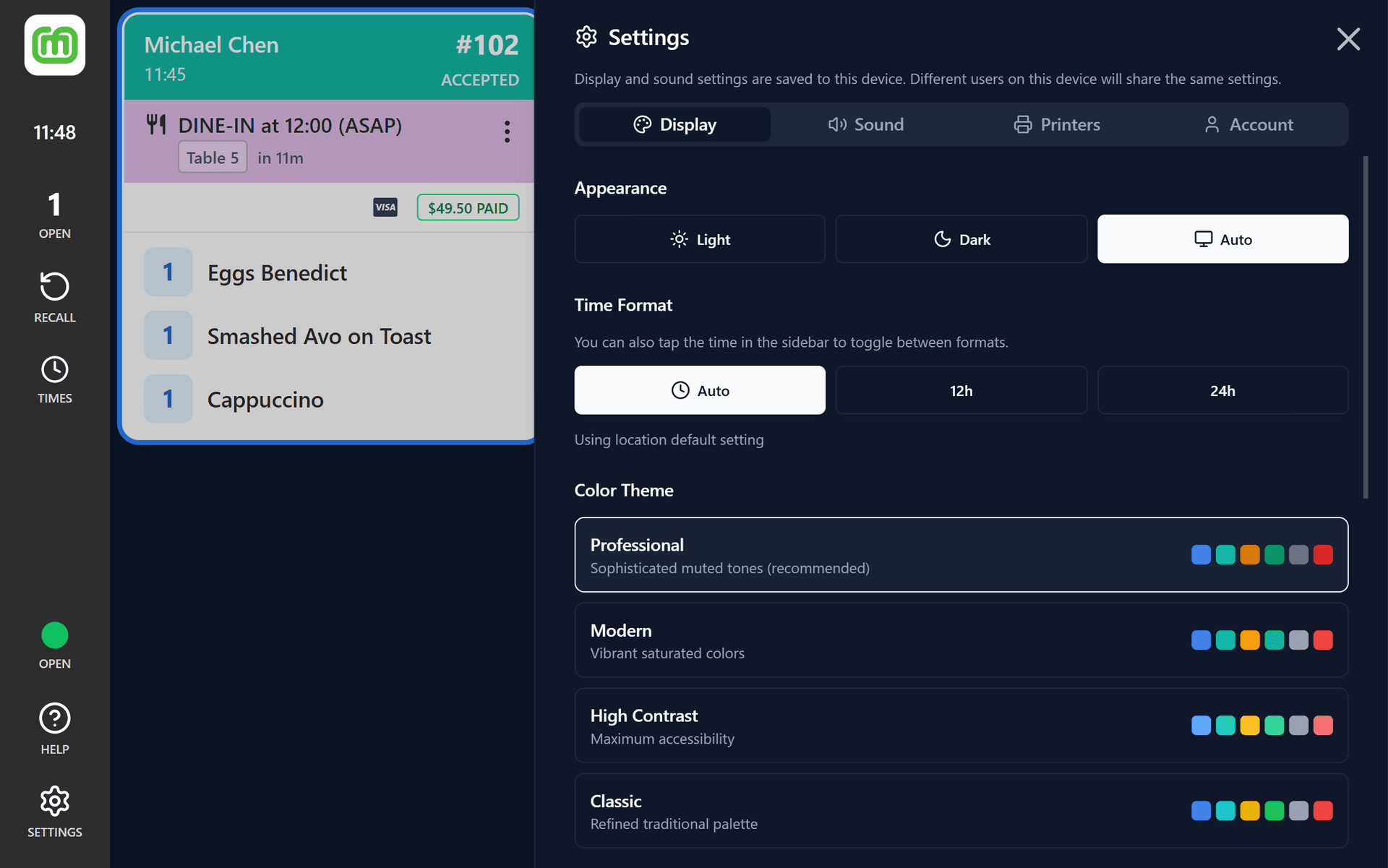
Customise Your Kitchen Display
Every kitchen is different. Tailor the display to match your workflow, lighting, and team preferences.
Theme
Light, Dark, or Auto — adapts to your environment.
Card Sizes
Compact, Standard, or Large — fit more or see more.
Content Scaling
Adjustable scaling for readability at any distance.
Time Format
12-hour or 24-hour — your choice.
Virtual Printer — Use Your POS With Your KDS
Enable Virtual Printer mode and your device acts as a network receipt printer. Any POS system that prints to a Star or Epson network printer can send dockets straight to your KDS — no API integration required.
Works with Lightspeed, Loyverse, Uniwell, and most ESC/POS-compatible point-of-sale systems. Square POS is not yet supported.
How It Works
No API integration, no middleware, no extra hardware. Just add your tablet's IP address as a printer in your POS and you're ready to go. The app decodes the receipt data and creates an order on your display automatically.
Virtual Printer screenshot
Features
- Automatic network discovery (mDNS, Star UDP, Epson ENPC)
- Docket Template Editor — teach the app your POS receipt layout
- Star raster and ESC/POS text decoding with inline image support
- Auto-accept, auto-print, and pass-through reprinting
- Virtual Printer orders sync across all KDS devices at your location
- Works alongside your regular mypreorder orders
- Available on Android and Windows
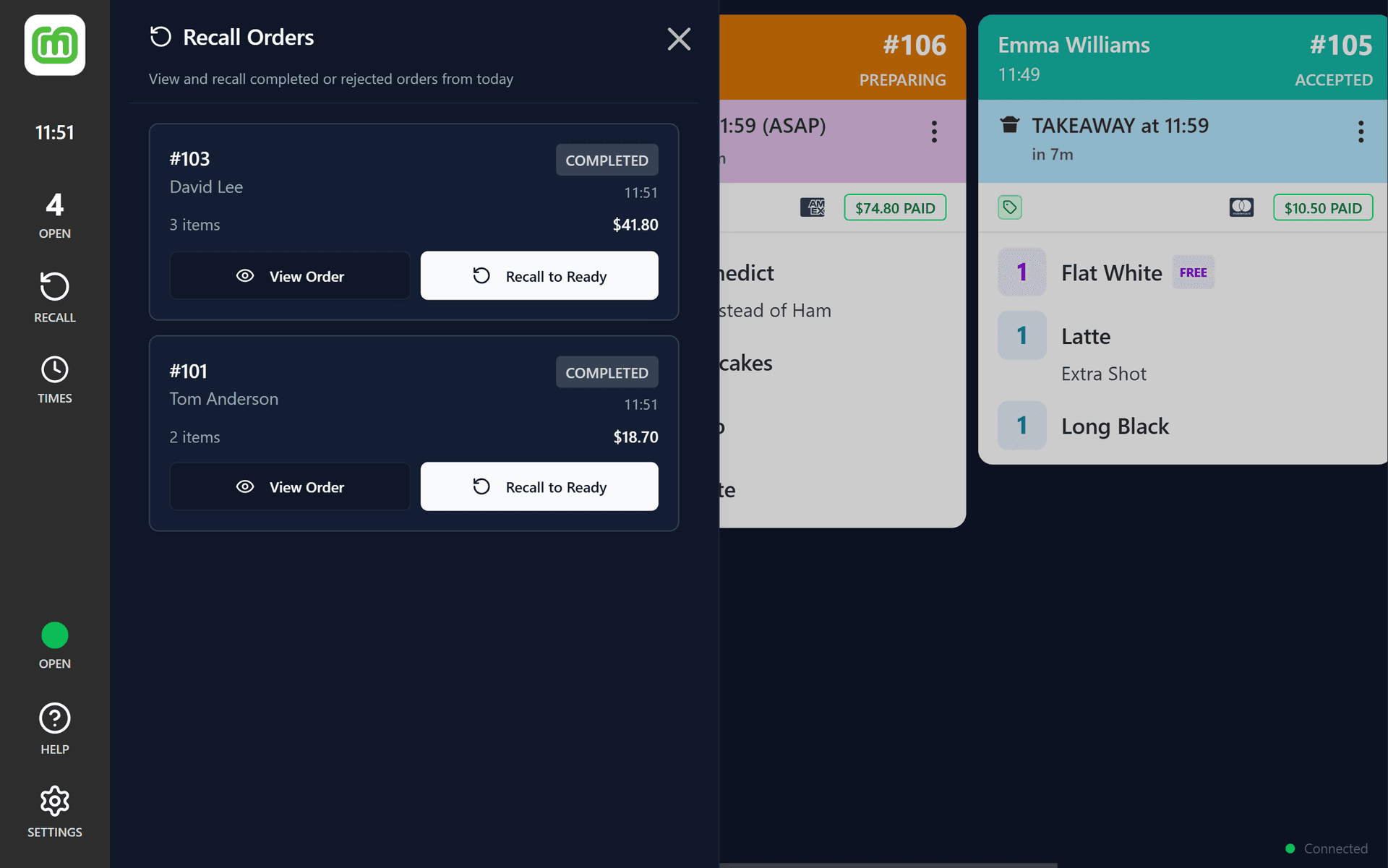
Recall & Manage Orders in Seconds
Every interaction is designed for speed. Horizontal scrolling, one-tap bumps, and instant recall — so your team can focus on what matters: getting orders out on time.
- Horizontal scrolling card layout for quick scanning
- Tap the order header to bump to the next stage
- Tap items to strike them off as you prepare them
- Recall completed or rejected orders instantly
- Order animations and visual cues for new, urgent, and completed orders
- Built-in keyboard shortcuts for power users
KDS for Android, Windows & iOS
Use the KDS as a native Android app, a Windows desktop app, or on iPad (coming soon). Responsive layout from phone screens to large wall-mounted displays.
Android
Native app for Android 8.0+ tablets with auto-start on boot and keep awake.

Windows
Desktop app for Windows 10+ with Virtual Printer support and full-screen kitchen display.

iOS (iPad)
Native iPad app for an optimised kitchen display experience on Apple hardware.
 Soon
SoonKitchen Display System FAQ
Everything you need to know about the Kitchen Display System.
The KDS works on Android tablets (Android 8.0 or higher), Windows PCs and tablets (Windows 10 or higher via the Microsoft Store), and iPads (coming soon). It scales from phone screens all the way up to large wall-mounted displays.
No special hardware is required beyond a standard ESC/POS thermal receipt printer. The KDS supports Star Micronics, Epson, and generic thermal printers in both 58mm and 80mm paper widths. Connect via your network (TCP/IP) or Bluetooth (Android only).
Virtual Printer turns your device into a network receipt printer. Any POS system that prints to a Star or Epson network printer can send dockets straight to your KDS — no API integration, no middleware, no extra hardware. Simply add your device's IP address as a printer in your POS and you're ready to go. Works with Lightspeed, Loyverse, Uniwell, and most ESC/POS-compatible systems. Square POS is not yet supported.
Yes. All KDS devices at your location sync in real time. When one device bumps an order to the next stage, every other display updates instantly. This is ideal for kitchens with separate stations for different preparation areas.
You can adjust lead times for Pickup, Delivery, and Dine-in orders directly from the KDS. Changes are pushed instantly to mypreorder so customers always see accurate wait times when placing their orders.
Yes. Toggle your store on or off directly from the KDS. The status change syncs back to mypreorder in real time, so your online menu reflects your availability the moment you tap the button.
The KDS is built with automatic reconnect and offline fallback. If your connection drops briefly, it will reconnect automatically and sync any missed updates. Your existing orders remain visible on screen during the outage.
Yes, the KDS is designed to work with mypreorder's online ordering platform. You'll need a mypreorder merchant account to register and use the KDS. Contact us or sign up to get started.
Yes. The mypreorder Kitchen Display System is fully available across New Zealand. Pricing is in NZD, and all KDS features — including docket printing, lead time control, Virtual Printer, and multi-device sync — work the same as in Australia. Sign up at mypreorder.co.nz to get started.
What Our Customers Say
There's lot to love about mypreorder. Customers love how easy it is to use and set up favourites for repeat orders. Our team love the printed order tickets. And I love the seamless integration with our POS and back up support from John and his team.
If you're looking for an online platform, look no further… this has been a game changer for our business.
We have used mypreorder for over 10 years for both our customers and our own projects. We stick with them because their product works well and is absolutely reliable. Whenever we need assistance and integrations, they are always provided quickly and without any problem.
We are now using mypreorder in our Wallet Pass payments and distribution solutions for clubs and gyms and will be using mypreorder for all our new projects.
mypreorder has been a game-changer for our café. It's the perfect app for customers who are on the go, whether they're heading to work or just passing through and short on time. With the ability to pre-order and set a pickup time, they can skip the queue and grab their coffee and toastie without the wait—something our regulars absolutely love, especially during busy rush hours. From a business perspective, mypreorder is an incredibly valuable tool. It allows us to showcase our menu with photos and descriptions, promote specials, and provide a seamless ordering experience. It's a great way to boost sales, and honestly, any café not using it is missing out! The support from the mypreorder team has been outstanding. They're always available to assist, helping us refine and develop our use of the app to meet our needs. We highly recommend it to any café looking to improve efficiency and customer experience.
We have been using mypreorder for over a decade, and it has been an essential part of our business growth. John Daniels has been fantastic to work with - always contactable, incredibly helpful, and willing to tailor solutions that suit our needs.
Over the years, John has supported us in expanding our services, ensuring mypreorder adapts to our evolving business, including catering, our virtual kitchen, frozen meals, and giftware. His expertise and dedication have made a significant difference, and we highly recommend him to any business looking for a reliable and flexible online ordering platform.
We recently opened a new cafe and wanted a solid online ordering platform. We contacted John at mypreorder who helped us through the whole process, including planning, POS integration and training.
John provided a high level of support and advice throughout the entire set-up process ensuring that all our requests were addressed promptly. The installation was straight forward and we are very happy with the system. Our customers make good use of the online facility and comment on the ease of use. Thank you, John, for your great service!
mypreorder is remarkable, it enables our business to grow across various sites with simple Copy Menu implementing. It is cost effective, easy to use and John is amazing to deal with.
The App is the most important part of our business so it was important to find the right one and we have. The features are fantastic with colour images, description and various price methods for add ons. Can't recommend this App enough and the Service received by John.
mypreorder has been a trusted partner of Sir Charles Gairdner Hospital for over 10 years, providing a reliable online ordering app for both our hospital canteen and coffee cart. Their platform has helped us streamline operations, reduce wait times, and improve convenience for staff and visitors alike, who all love using the app.
The team at mypreorder is always responsive and committed to delivering excellent service. The system itself is easy to navigate for our staff members who have to make changes to menu items, and the team at mypreorder is always happy to assist with this if we are unable. We highly recommend them to any organisation looking for a dependable online ordering solution!
Ready to Transform Your Kitchen?
Try the KDS free for 30 days — no credit card required.
Choose Essentials for your kitchen display, or Pro for the full online ordering platform.